 Visual Vocal Training
For your voice. For iPhone and iPad.
See your voice.
Find your pitch.
Turn “was that the right note?” into something you can see. Follow your pitch as you sing, practice with a guide, and get to know your voice—one session at a time.
Explore the appComing soon to the App Store.
Free daily practice, with optional Pro subscriptions.
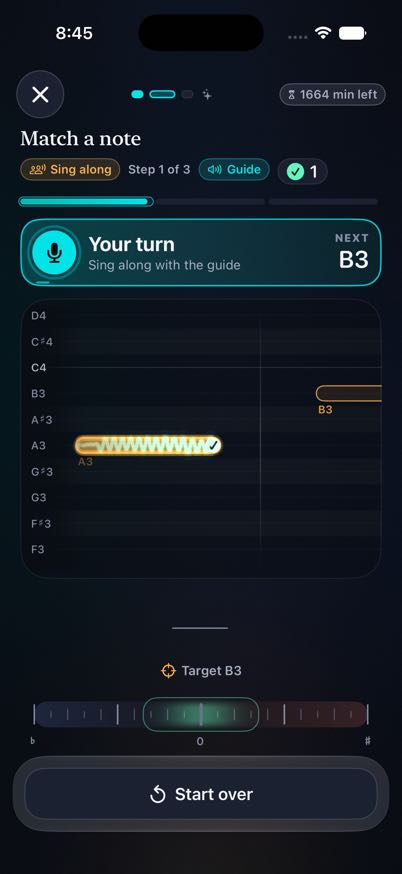
Your voice, visible in real time.
A little direction.
A lot more clarity.
Start with a gentle voice check to find a comfortable range. Then follow a practice plan that adapts to your results, with clear visual targets and useful feedback after each attempt.
Make practice
something you can follow.
Watch the note take shape.
See whether you’re above, below, or on the target. Explore freely in the live pitch monitor or follow a guided exercise.
Listen. Sing. Try again.
Sing along with a guide, echo a phrase, and build toward more independent practice. Optional headphone monitoring helps you hear your own voice.
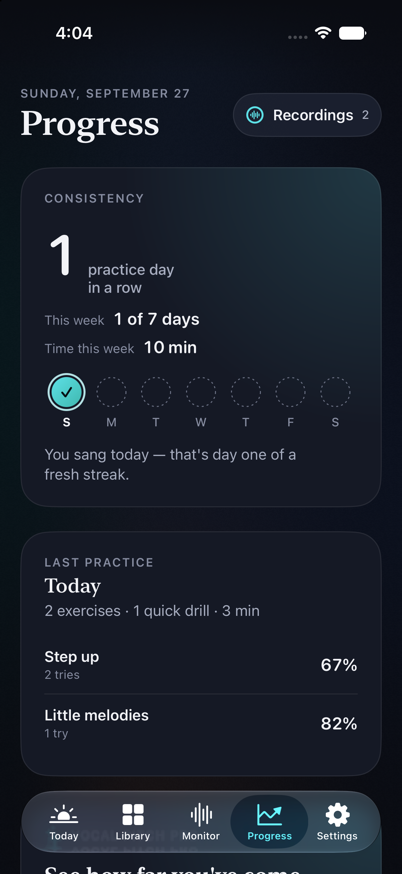
Get to know your progress.
Review your practice history, comfortable range, and skill trends. Save an attempt when you want to hear it again.
Your voice stays yours.
Pitch analysis happens on your device. No app account is required. Recordings are saved only when you ask and stay on your device; optional iCloud sync keeps progress and settings in step across iPhone and iPad.
Read the privacy policyA few things to know.
Do I need singing experience?
No. The voice check helps establish a starting point, and exercises work within a comfortable range. You can also open the live monitor and explore at your own pace.
What’s free, and what does Pro add?
Free access includes daily allowances for live monitoring and guided practice. Pro unlocks unlimited monitoring and practice, the full drill library, adaptive plans, and detailed progress. Available prices and any trial terms are shown in the app before you subscribe.
Can I use AirPods or headphones?
Yes. Optional in-ear monitoring lets you hear your voice while you practice. The microphone, sound quality, and delay depend on your headphones and audio route.
Is this a substitute for a voice teacher?
Visual Vocal Training gives feedback on pitch and practice performance. It does not diagnose vocal health or replace individualized instruction. Sing comfortably and stop if singing causes pain or strain.
When can I download it?
Visual Vocal Training is preparing for its first App Store release. This page will link to the download once the app is available.